
2026-08-26
Two routes built the same payload, and only one of them signed
An image opened from the file tree reported that it could not be served from the current workspace. A list of callers is what missed the second caller.
Self-hosted agent for infrastructure
nanoinfra reaches your servers over SSH, Ansible or SSM with credentials you hold. A capability gate in a separate process decides on every remote command — and the agent that asks holds neither the credential nor the decision.
uv tool install nanoinfra
nanoinfra onboard --wizard
python -m pip install nanoinfra
nanoinfra onboard --wizard
in a virtual environment, or pip reports externally-managed-environment
docker run --rm -it \
  -v ~/.nanoinfra:/home/nanoinfra/.nanoinfra \
  ghcr.io/nanoinfraorg/nanoinfra onboard --wizard
docker run -d --name nanoinfra \
  -v ~/.nanoinfra:/home/nanoinfra/.nanoinfra \
  ghcr.io/nanoinfraorg/nanoinfra gateway
`gateway` is not optional: the default command is `status` · the WebUI binds 127.0.0.1 inside the container, so publishing 8765 needs channels.websocket.host = 0.0.0.0 and a token
git clone https://github.com/nanoinfraorg/nanoinfra.git
cd nanoinfra && uv sync
uv run nanoinfra onboard --wizard
uv reads the lockfile in the repo · bun or npm has to be present, because it builds the WebUI
One decision, three answers, one record
Measured on a running deployment
a container, v2.0.4
ps -eo user,comm --forest
▸ nanoinfra            gateway
  root                 \_ entrypoint.sh
  nanoinfra-exec       |   \_ exec
  root                 \_ entrypoint.sh
  nanoinfra-fetch      |   \_ fetch
  root                 \_ entrypoint.sh
  nanoinfra-mcp        |   \_ mcp
  root                 \_ entrypoint.sh
  nanoinfra-connector      \_ connector
The agent loop, the channels and the WebUI. It asks for every remote action and is answered by another process — it holds no credential and makes no decision.
Account
nanoinfra
the uid you installed as
Secrets key in this process
absent
exec'd with the variable removed
Serves
127.0.0.1:8765
WebUI and the OpenAI-compatible API
ps -eo user,comm --forest
  nanoinfra            gateway
  root                 \_ entrypoint.sh
▸ nanoinfra-exec       |   \_ exec
  root                 \_ entrypoint.sh
  nanoinfra-fetch      |   \_ fetch
  root                 \_ entrypoint.sh
  nanoinfra-mcp        |   \_ mcp
  root                 \_ entrypoint.sh
  nanoinfra-connector      \_ connector
The executor. It owns the credential store, resolves a secret for a remote action, answers the gate, and appends every decision to a log the agent may read and may not write.
Landlock
abi 6 · 49 rules
filesystem policy applied before it serves
Holds
the key and the verdict
credential store · gate decisions · audit log
TCP listeners
none
reached only over a unix socket
ps -eo user,comm --forest
  nanoinfra            gateway
  root                 \_ entrypoint.sh
  nanoinfra-exec       |   \_ exec
  root                 \_ entrypoint.sh
▸ nanoinfra-fetch      |   \_ fetch
  root                 \_ entrypoint.sh
  nanoinfra-mcp        |   \_ mcp
  root                 \_ entrypoint.sh
  nanoinfra-connector      \_ connector
Web search and web fetch, on their own uid. A page the model asked for is retrieved by a process that cannot read your inventory, your secrets or your transcripts.
Landlock
abi 6 · 42 rules
narrower than the executor's
TCP connect
53 · 80 · 443 · 8080
the allowlist includes your configured backend
TCP listeners
none
no inbound path into this process
ps -eo user,comm --forest
  nanoinfra            gateway
  root                 \_ entrypoint.sh
  nanoinfra-exec       |   \_ exec
  root                 \_ entrypoint.sh
  nanoinfra-fetch      |   \_ fetch
  root                 \_ entrypoint.sh
▸ nanoinfra-mcp        |   \_ mcp
  root                 \_ entrypoint.sh
  nanoinfra-connector      \_ connector
MCP servers run here, on this account, not in the agent. A server that misbehaves costs you this process and nothing above it, and it cannot listen for connections.
Landlock
abi 6 · 46 rules
filesystem policy per server process
Isolation
uid nanoinfra-mcp
a separate account from the agent
TCP listeners
none
stdio to the host process only
ps -eo user,comm --forest
  nanoinfra            gateway
  root                 \_ entrypoint.sh
  nanoinfra-exec       |   \_ exec
  root                 \_ entrypoint.sh
  nanoinfra-fetch      |   \_ fetch
  root                 \_ entrypoint.sh
  nanoinfra-mcp        |   \_ mcp
  root                 \_ entrypoint.sh
▸ nanoinfra-connector      \_ connector
The HTTPS request a marketplace connector package declares, made here rather than in the executor that holds the credential store. Its ipc group holds nanoinfra-exec and not nanoinfra, so a connector call starts after the gate answered — nothing the model steers reaches this account.
Landlock
abi 6 · 42 rules
measured on the container running v2.0.4
TCP connect
443
one port, and it is the only thing this account does
Reachable by
the executor only
not by the agent: a different ipc group
Four answers, three scopes, three contexts. The shipped policy refuses every remote command in an unattended turn, and only a standing grant you wrote into config permits one.
allow
runs
approve
asks a person
grant
matches config
deny
never runs
unattended · mutate.remote · host=grant group=deny all=deny
You write it, a reviewer reads it, and it permits that command on that host and nothing adjacent. A deny stays a deny.
The executor appends every decision to its own audit log, which the agent may read and may not write. Denial latches survive a restart because they are rebuilt from that log.
You learn what a 03:00 run will meet when you create it, not at 03:00. A job that would be refused saves itself disabled, carrying the finding.
A tree, a preview, and bytes the browser can render
▸ cron/
▸ diagrams/
▸ memory/
▸ secrets/
▸ servers/
  AGENTS.md                    1.9 KB
  runbook-failover.md          6.0 KB
  staging-topology.drawio       13 KB
  staging-topology.png         242 KB
Preview · image/png, sniffed from the bytes
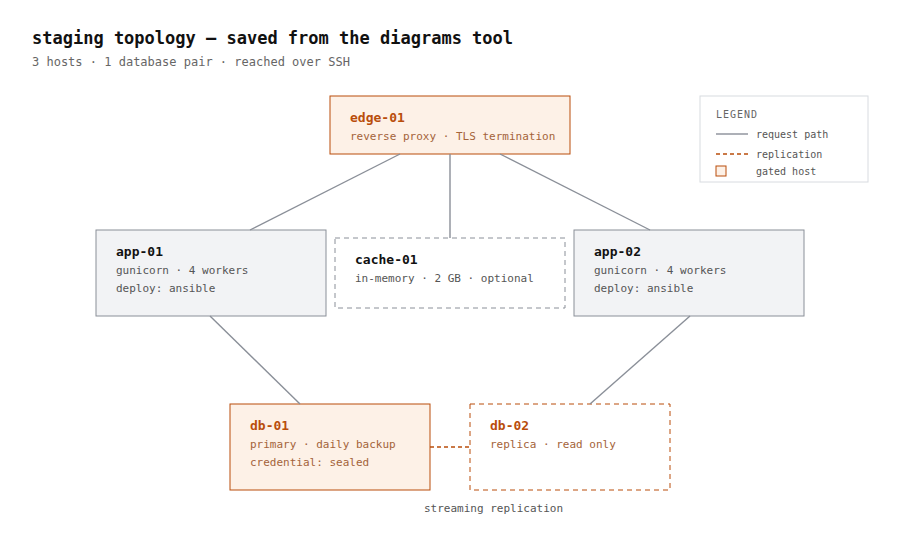
The preview used to be text by construction: a NUL byte in the first 4 KiB was a refusal, so a picture the agent had just written never even became a clickable link. Now the type comes from the bytes — never the file name — and the panel renders it. A PDF opens in the browser's own viewer, sandboxed. Anything else offers itself as a download.
Drag a directory in, review the plan, and it transfers in frame-sized chunks up to 100 MB. .git stays out unless you ask for it.
A workspaces root with a switcher, and an existing install is moved under it rather than left outside the root its own picker reports against.
Ten channels, one agent loop. The gate does not care which one a message arrived on — an unattended turn is an unattended turn whether it came from cron or from a chat.
DM pairing
socket mode
guild + DM
E2EE rooms
127.0.0.1:8765
signal-cli
IMAP + SMTP
bot framework
self-hosted
pairing code
Three ways in, and each one lands somewhere different
In the agent
A directory with instructions in it. You read one before you enable it, and the agent writes you a new one on request.
~/.nanoinfra/skills/
In its own process
A stdio server gets its own account and its own Landlock policy, so a bad one costs you a process rather than a credential. You choose which of its tools the model sees.
stdio · sse · streamableHttp
In your code
A Python entry point registers a tool with its own capability class, so the gate treats it like any other action.
nanoinfra.tools
Your machine, your credentials, and a boundary that holds when nobody is watching. Read the code before you trust it. It is small on purpose.